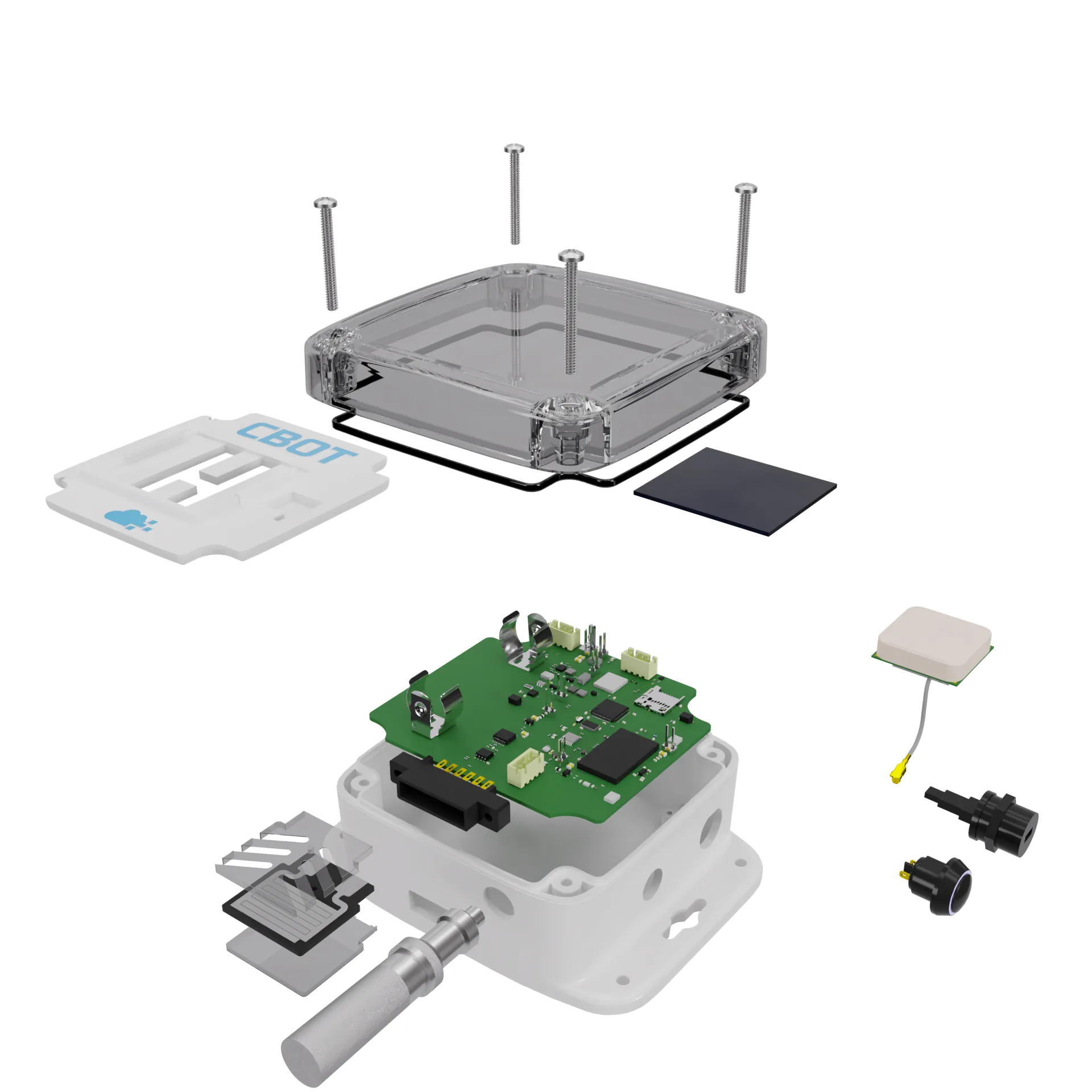
You can almost always turn a CAD file into a product render without remodelling anything. Export the assembly as STEP, tessellate it at the right density, keep the part structure, then fix three things CAD never cares about: edges that are too sharp, surfaces with no texture coordinates and internals nobody will ever see. On a typical consumer product that's half a day of preparation, not a week of rebuilding. Where people lose time is in the export, and it's usually because the file was saved in a format that threw away exactly the information the render needed.
I do this every week, from both sides. I model in Fusion 360 and render in Blender with Cycles or in KeyShot, so I see what breaks when a perfectly good engineering model meets a renderer.
Which file to export (and which one to avoid)
Send STEP. If your CAD is SolidWorks, Inventor, Onshape, Creo or Fusion, a STEP AP214 or AP242 export keeps every body as a separate solid, keeps the assembly tree, and often keeps colours per body. That last part matters more than it sounds. Body names and colours are how I assign materials quickly, so an assembly where the housing is called "Housing_PC_White" and the buttons are "Button_TPE" saves me an hour of clicking.
STL is the one to avoid. It's a single triangle soup with no units, no names, no colours and no hierarchy. Every face of a 60-part assembly ends up glued into one object, and I have to separate it by hand before I can even give the screws a different material from the shell. If an STL is all you've got, I can still work with it, but the price and the timeline both go up a bit.
Native files (.f3d, .sldprt, .ipt) are fine too, as long as I have the software to open them or you can also send a STEP. KeyShot reads STEP directly. Blender doesn't, so I tessellate in Fusion 360 or KeyShot first and bring in an FBX or OBJ with the hierarchy intact.
Tessellation: the setting that decides how the render looks
CAD stores exact surfaces. A renderer needs triangles. The conversion between them is controlled by two numbers: how far a triangle may deviate from the true surface (chord tolerance) and the maximum angle between neighbouring triangles (angular tolerance).
My defaults for a hand-held product: 0.01 to 0.02 mm chord tolerance and around 5 degrees angle. That gives smooth highlights on a 120 mm housing without bloating the file. A 15 mm knob with a tight fillet might need finer. A 2 m sauna bench doesn't need anywhere near that.
Here's the counter-intuitive bit: finer is not always better. Push the tolerance down to 0.001 mm on a full assembly and you get tens of millions of triangles, most of them on screw threads and internal ribs that end up in shadow. The viewport crawls, the file hits a few gigabytes and the render gets no sharper, because the highlight quality is limited by the shading normals, not the triangle count. I'd rather have 1.5 million well-placed triangles than 20 million evenly spread ones.
Coarse tessellation shows up as faceting: little flat bands in the reflection along a curved edge. If you see that on a cylinder, the angular tolerance is too loose. It's fixable in a few minutes by re-exporting that one part, which is another reason to keep the bodies separate.
Sharp CAD edges look fake
Real parts don't have perfectly sharp edges. Even a machined aluminium block has a small break on every corner, and a moulded part has radii everywhere the tool steel was cut. Engineers often leave those out of CAD because they don't affect function, so the render shows razor-thin edges that catch no light. That's the single biggest reason a render from CAD looks like a render from CAD.
Ever wondered why some product shots look plasticky? This is usually it.
Two ways to fix it. If the edges matter (a visible chamfer on a phone stand, a fillet on a lid), I add them in CAD: 0.3 to 0.5 mm on plastic parts, 0.2 mm on machined metal. If they're everywhere and small, I use a bevel shader in Cycles, which rounds the edge at render time without touching geometry. It costs some render time, roughly 10 to 20% on a typical studio shot, but it's much faster than filleting 300 edges by hand.
Materials, textures and the missing UVs
CAD has no texture coordinates. For flat colours and glossy plastics that doesn't matter at all. It matters the moment a surface needs a pattern: brushed aluminium with a direction, wood grain on a bench, fabric on a cushion, a fine VDI texture on a moulded housing.
For most of those I use box or triplanar projection, which wraps the texture onto the surface from three directions and blends the seams. It works on 90% of product shapes. Brushed metal is the exception, because the brush direction has to follow the part, so for a round knob I'll unwrap that one body properly. Logos and labels go on as decals from your vector file (SVG or PDF), never as a screenshot.
Tell me the real material and finish if you know them. "PC, Mold-Tech MT-11010, white" gets you a far more honest render than "plastic, white".
Strip what the camera never sees
Last spring a hardware startup sent me a STEP of a sensor enclosure straight from their engineering assembly: 1,140 bodies, including every capacitor on the PCB, every thread and a full set of fasteners. Tessellated, it came to about 11 million triangles. For the four hero shots they wanted, only the housing, the lid, the gasket and the six visible screws mattered. After hiding the board components and replacing the threads with plain cylinders it dropped to 1.3 million, and a 4000 px frame rendered in about 12 minutes instead of 40.
For an exploded view you keep more, obviously. But even then, a 0402 resistor is invisible at catalogue size.
So the cleanest thing you can do before sending is a "visual" configuration of the assembly with internal electronics suppressed. If that's awkward, send it all and I'll strip it, it just takes longer.
Common mistakes that cost a day
Most of my rework comes from a short list:
- Units: a part exported in metres from one tool and read as millimetres in another arrives 1,000 times too small. Lighting and depth of field then behave strangely, because both depend on scale.
- Flipped normals and coincident faces, usually from surface models or bodies that overlap by a few microns. They show up as black patches or flickering stripes.
- One giant merged body, so nothing can get its own material.
- An old revision. I've rendered a lid that had already been redesigned, twice. Put the revision letter in the file name.
None of these are hard, just slow to find at 11 pm.
What I'd actually do if I were sending you my file
Export one STEP AP242 of the assembly with colours on, units in millimetres and internals suppressed. Add a short note: material and finish per visible part, the colour codes (RAL or Pantone), the logo as SVG, and two or three reference images of the mood you want. That's all. Don't spend time making it "render ready" in CAD unless the fillets are part of the real design anyway, because I'd rather add bevels in the shader than have you change the engineering model.
And don't remodel from scratch. I see people pay for a hard-surface remodel of something that already exists as a precise CAD model. That only makes sense when the CAD is unusable (a scan, or a model that's years out of date), and then it's really a CAD design job, not a render job.
If you work in SolidWorks and need edits back in a form your team can open, I keep changes in Fusion 360 and hand over SolidWorks-compatible files in STEP or Parasolid, so the render model and the engineering model don't drift apart.
For the full picture of how I go from that file to marketing images, there's more on the product visualization page and the 3D product rendering service. If you have a model and a deadline, send it over and I'll tell you honestly what it needs before anyone starts.